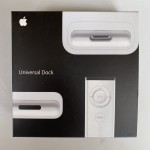
iPod Universal Dock for iPod nano (third generation), select iPod classic, select iPod with video, iPod touch
Connect the Dock to your computer with the cable that came with your iPod or iPhone, then place your iPod or iPhone in the Dock to sync and charge the battery. No more reaching behind the computer to plug it in.
Connect the Dock to an electrical outlet using a USB Power Adapter, then place your iPod or iPhone in the Dock to charge the battery.
Connect the Dock to a stereo or speakers using a stereo audio cable to play music from iPod or iPhone.
Control playback from a distance using the included Apple Remote.