Shop by Department


Categories: Xiaomi
| Parameters and specifications | |
|---|---|
| For tablet model | Xiaomi Pad 6S Pro + Xiaomi Pad 6 Max + Xiaomi Pad 7 Pro + Xiaomi Pad 7 |
| Designed for device brand | Xiaomi |
| Color and shade | White |
| Distribution | Global |
| Type of goods | Touch pen (stylus) |
| Material | Polycarbonate + ABS |
| Manufacturer's website | www.mi.com/cz/ |
| Guarantee | 2 years |
| Guarantee for companies | 12 months |
| Country of manufacture | China |
| Compatibility | Xiaomi |
| Tip material | Jacket |
| Stylus diameter | 9mm |
| Tip technology | Active |
| Tip thickness | 1mm |
| Designed for devices | Tablet |
| Features | Magnetic attachment to the tablet + Palm rejection + Replaceable tip + Tilt detection + Pressure detection + Multiple tips in the package + Wireless charging + Power indicator |
| Battery life | 150 hours |
| Package dimensions | 200mm x 50mm x 22mm |
| Package weight | 90g |
Xiaomi Focus Pen is a premium stylus designed specifically for Xiaomi Pad 6S Pro 12.4, combining perfect design and advanced technology. This stylus is designed to help you fully utilize the potential of your tablet, whether it's drawing, taking notes, or giving professional presentations. With the precision, speed, and comfort it offers, Xiaomi Focus Pen is the ideal tool for anyone looking for the perfect balance between creativity and productivity.
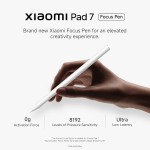
One of the main features of the Xiaomi Focus Pen is its incredible pressure sensitivity. With 8192 levels of pressure sensitivity, you can easily capture every stroke – from fine lines to bold strokes, making it an ideal tool for illustrators, designers and students. In addition, the stylus boasts an extremely low latency of just 3ms, ensuring a smooth and realistic writing and drawing experience. In addition, it supports the quick wake function – just lift the stylus and start creating immediately, without any delay.
The stylus is equipped with multi-function buttons that increase its versatility. Thanks to them, you can easily switch between different modes, such as pointer, highlighter, remote camera shutter or eraser. These buttons are intuitively placed to make operation as easy as possible. In addition, the Xiaomi Focus Pen offers an antibacterial finish that contributes to more hygienic use. The elegant black and gold design gives the pen a sophisticated look that is suitable not only for the work environment, but also for personal creation.
The product is packaged in an elegant slide-out box. Inside, the product is in a plastic blister.
Please read this manual before use. Illustrative photos can be found in the product packaging. Detailed instructions with usage tips are available directly on the device after connecting to the stylus.
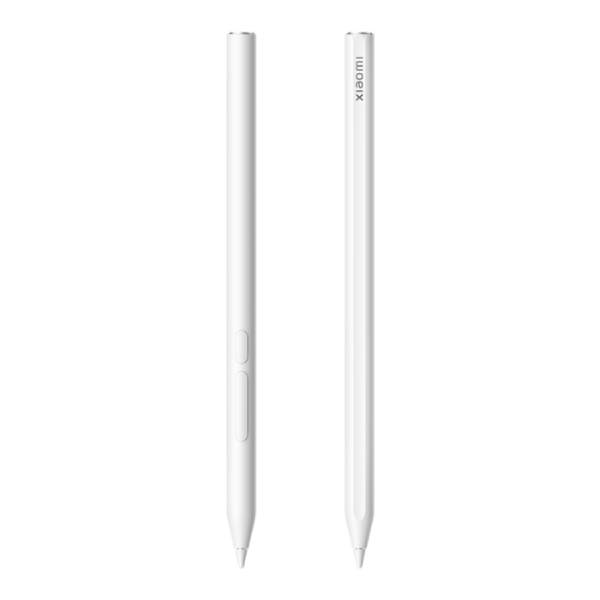
The stylus consists of:
Apex
Body
Primary button
Secondary button
Magnetic attachment and pairing:
Place the stylus with the straight edge against the side of the tablet. This will magnetically attach, automatically pair, and charge wirelessly.
When pairing for the first time, remove any protective cover from the tablet.
Compatibility:
Make sure your tablet's system and apps are updated to the latest version.
The stylus is only intended for use with the following Xiaomi tablet models: Xiaomi Mi Pad 7 / 7 Pro / 6S Pro / 6 Max
If pairing doesn't work:
Remove the tablet's protective cover to avoid magnetic field interference.
Restart the tablet.
Check if Bluetooth is turned on.
Charge the stylus by placing it on the tablet if the battery is low.
Stylus tip:
The tip may wear out with use. If the tip becomes damaged or worn, replace it with a new one to avoid damaging the screen.
Use a soft cloth to clean the tip. Regularly remove dust and other debris.
Tip replacement:
Grasp the tip with your fingers and pull it out gently.
Insert the new nib into the stylus and make sure it is firmly seated.
Primary button:
By default, it opens the notepad (when you press, hold, and touch the screen).
Secondary button:
The default function is to take a screenshot.
Customization option:
The button functions can be changed in the tablet settings.
Operation and storage: Use within a temperature range of 0–35°C. Store at temperatures of –20–45°C.
Damaged stylus: Do not use if the stylus is damaged. Do not remove the battery.
Service: Entrust all service to authorized Xiaomi service centers.
Safety:
Keep a distance of at least 15 cm from medical devices such as pacemakers or hearing aids.
Do not give the stylus to children under 6 years of age. Keep older children under supervision.
Hazardous environments: Do not use in areas with a risk of fire or explosion (e.g. gas stations, hazardous materials warehouses).
Recycling: At the end of its life, dispose of the stylus in a waste electrical and electronic equipment container or return it to your retailer for recycling.
 English
